Poison tournaments are a form of "Baseball Darwinism." The strong get stronger and the weak get weaker. Owners must manage changing rosters as players come and go.
Definitions
Player Exchange: An exchange of personnel (usually position for position, e.g., SP for SP) initiated by the winning team, which seeks to grow stronger by sending off a player of lesser-quality in exchange for a player of higher-quality. We can think of the exchange as a form of theft, i.e., stealing a player of better quality and shipping out the player of lesser quality. Player exchanges are sim-determined based on the sim's understanding of player quality (specifically it is based on the PV, or player value, for the random season assigned to a player when the tournament begins, not on current sim statistics/performance).
Poison Pitcher: Anytime a poison team sends away a pitcher, that pitcher has poison status such that. Any subsequent win by that pitcher results in a player exchange benefitting his team.
Poison Team: refers to the status of a given team, specifically, the granted authority to a a team to initiate a player exchange every time they win a game.
Non-Poison Team: refers to the status of a team without poison status. Non poison teams initiate player exchanges only when they either (a) shut out the opposition, or (b) when a poison pitcher (if they own one) gets a win.
Rules
Each tournament has either 2 or 4 "poison" teams at the start of the tournament. These teams are run by the sim, without owners, and carry a special cross symbol to identify themselves.
Poison teams will exchange a player with you if you lose to them.
If you beat a poison team no exchange takes place, unless you shut them out, in which case your team initiates an exchange AND steals their poison status.
Shutouts always initiate a player exchange.
Poison teams can initiate player exchanges simply by beating the opposition. Non-poison teams must shut out the opposition to initiate an exchange.
The winning team will forego an exchange if they conclude that they cannot improve themselves by an exchange.
If your team receives a pitcher from a poison team, that pitcher becomes poison. If subsequently credited with a win, that initiates a player exchange.
Teams can become double and triple poison. This does not add to their power. Rather it simply insulates their poison status.
Tournaments last only 30 games: two divisions of eight teams each with a 7-game championship between division winners.
Games last no more than 11 innings. A tie is declared if teams are still tied after 11 innings.
For competitive challenge, rosters are small - usually 14 batters and 13 pitchers. 13. Exchanges carry over into the championship series.
Why Splits Matter in Nostalgia Sim Baseball
This article is not intended as a comprehensive explanation of splits. We assume basic knowledge of splits and how they function in the game of baseball. This article deals with the more problematic aspects of approaching split stats when data is missing. Nevertheless, some knowledge of why splits matter in the sim is integral to gaining that often-elusive "managerial edge."
The Elusive "Managerial Edge"
Whether a player's performance in Left/Right situations is truly linked to the skill set of the batter and pitcher is unclear when the sample size is small. And splits may reverse trend from season to season. It's common to see a batter do better against lefties one season and a reversal in the following season. Yet, over the course of a career what looks like haphazard flip-flopping settles into a longitudinal trend. We can expect lefty-lefty and righty-righty matchups to be tougher on batters because those trends endure through time. Because our sim makes split stats an integral part of sim, managers can utilize these trends to their advantage. Some things to consider:
The more extreme a player's variation in Home/Road or Left/Right situations, the more he can be utilized to your advantage. A pitcher that is much better at home than on the road, can be given a disproportional number of starts at home to provide an advantage.
Lineups can be created according to Rome/Road and Left/Right splits to maximize these advantages on a regular basis.
A left-handed batter who hits well against lefties or a right-handed pitcher who does better against left-handed batters (i.e., breaks the mold) is likely more valuable than their raw monetary value shows.
Our sim keeps a cumulative record of a players situational performances in the so-called sim database. That data can be researched and studied prior to drafts, trades, and waiver acquisitions, to maximize the effectiveness of your team in your ballpark.
Stat splits research in simulation database
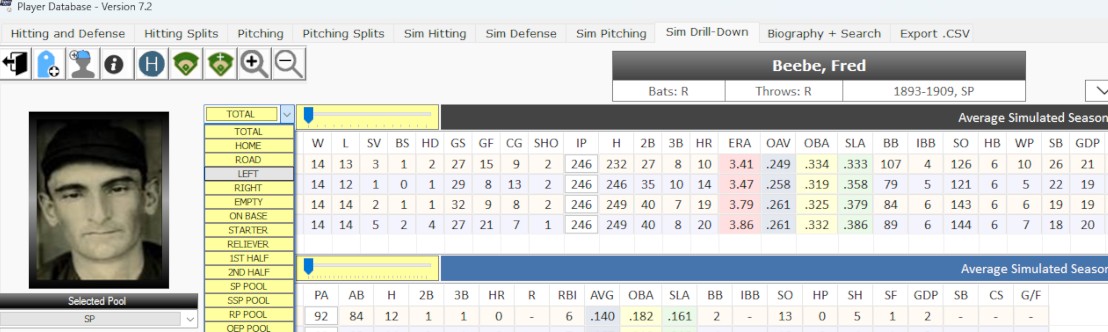
By using the dropdown controls in the Sim Drilldown Tab of the Database, one can research long-term trends on player stats. Seasonal historical splits can be viewed on the Hitting Splits and Pitching Splits tabs (same window).
Splits in Negro League Player Records
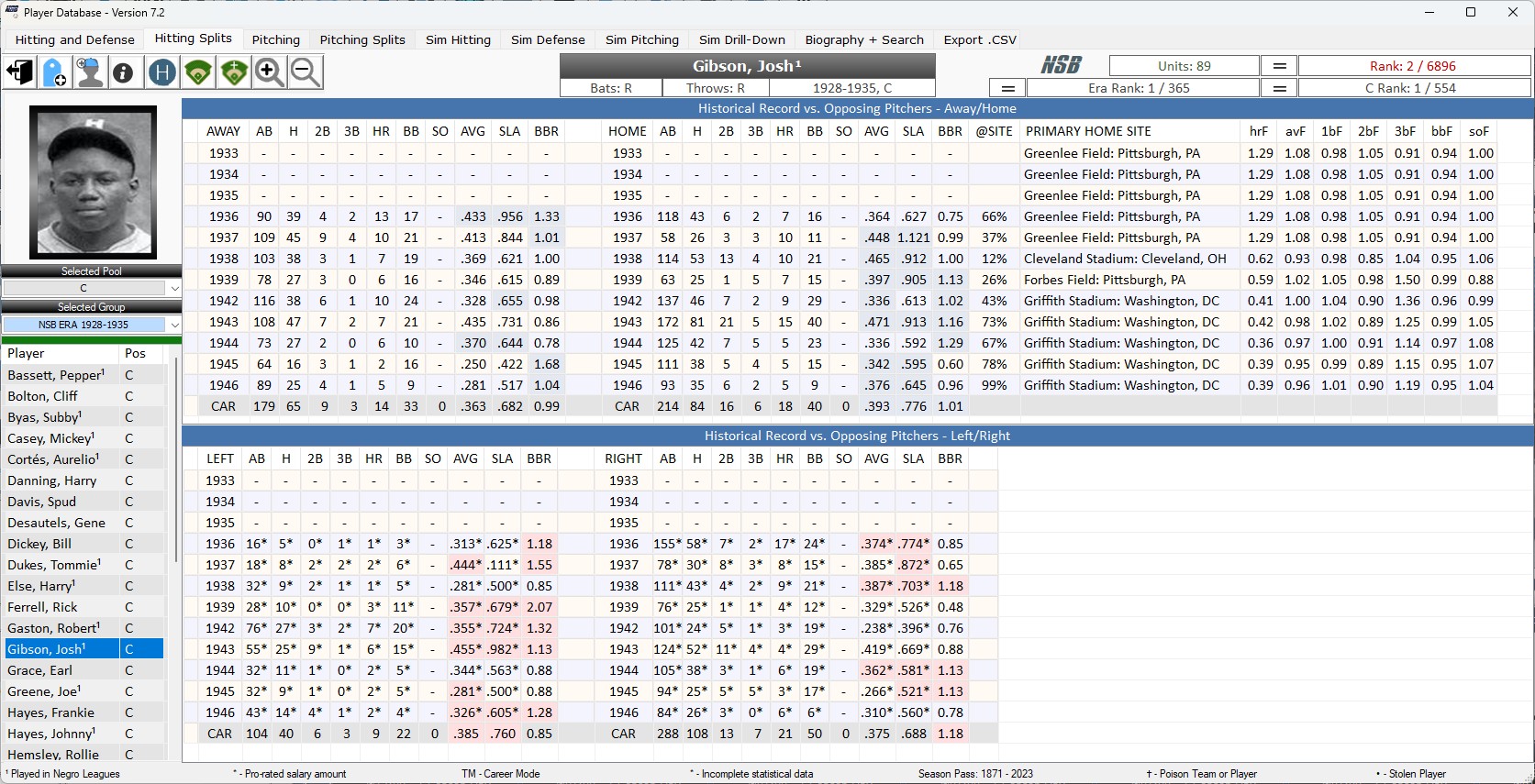
Stat splits are available for Negro League Players from 1936-1948. Home/Road stats are complete. Left/Right stats are partial, but we use previously-developed NSB algorithms to model/project these partials to realistic full-season scenarios. Home/road stats for the Negro Leagues introduce a new challenge to our game because so many games were of the "barnstorming" type, i.e., games played at parks across the country where one side would be arbitrarily selected as the "home" team. For this reason, we have researched the primary site for a player's "home" games and the percentage of play at that venue. This allows us to make realistic park adjustments to player stats. This data is shown on the splits tabs in the database. Behind this seemingly small enhancement lies an ambitious set of coding initiatives to determine ball park factors for the many, many parks where Negro League games were played. These factors are shown on the home split side of the database displays (see image below). As research unfolds, we will be able to further refine park factors and player stats for the years 1920 - 1935. The work is ongoing.
Thanks to the work of Retrosheet, we are able to add exhibition games, all-star games, and playoff games to the regular season games to produce a more rounded picture of performances. This now means that, unlike all other leagues, Negro League Players are not in “sealed” league universes. While this presents simulation challenges, we have decided that more data is better data for Negro League players since the data is sparse to begin with.
In the screen sample below, Josh Gibson's Home record shows his primary home site. Since many games were barnstormed or played in neutral parks where one team was arbitrarily selected as the "home" team, to get an accurate home park effect we must consider the primary site, the percentage of home plate appearances that took place place there, and work that into the overall probability structure. This differs from how we treat most other players, who almost always played the vast majority of their home games in the same park.
Josh Gibson stat splits home/road explanation
Handling Split Data when it's Incomplete
This section was written in response to a policy change of August 2016. Though useful information about all stat splits can be found here, it focuses on the way the sim handles left/right matchups when only partial split data is available.
Probabilities for batter-pitcher matchups are exceedingly complex. To get the best set of probabilities it is important for a sim to create a baseline series of probabilities taking into consideration players’ relative strength compared to the leagues and seasons they actually played in, the ballpark in which the game is taking place, play-fatigue, and a few other game-time conditions (e.g., whether the infield in in or deep, whether lines are being guarded, etc.)
On top of this baseline another complex set of formulas is used to asses the situational context (i.e., batting and pitching splits) in which batter-pitcher matchups take place. There are four main situational contexts used by Nostalgia Sim Baseball:
The handedness of the batter and the pitcher (LHB v LHP, LHB v RHP, RHB v LHP, RHB v RHP)
The location of the matchup (HOME v ROAD)
The state of baserunners (BASES EMPTY v ON BASE)
Whether the batter is pinch hitting
However, these sets of conditions are not weighted equally. #1 is weighted more heavily than #2, and #2 is weighted more heavily than #3. In fact, #3 is called upon only to determine the chance of a batter getting a walk. #4 is weighted as heavily as #1, although if a pinch hitter exceeds his actual pinch plate appearances then probabilities regress to his performance mean.
Before August 2016, the sim would only use split data from seasons where all split data was complete. From 1973 on, all split data is complete. Before 1973 there are increasing numbers of games missing from the data record, making it less reliable, although there are complete data sets before 1973 in a number or cases, and the research work continues over at Retrosheet. It’s much easier to get complete data for home/road splits than for left/right splits, because the former can be garnered from box score analysis.
Effective August 2016, however, a major initiative was completed to make our sim conducive to using whatever partial left/right split data we have. To do this well required lots of retrofitting, but we are pleased with the results. And we want to share with you how we did it so that there are no mysteries in your players’ performances.
Before going any further, two things:
Partial Left/Right Stats are published in the owner software package in the database window on the split tabs. Whenever a partial stat is in use, it is followed by an asterisk. You will also note two columns at the right headed “RPL” and “PERF”. These indicate the percentage of real play (RPL) represented in the split–the higher the percentage the more accurate the data–and the performance level (PERF) as a factor (.98 or 1.03 etc.) of the player’s total performance.
Remember that the nature of probabilities is often different than we suppose. To see the real effects of splits work themselves out, many thousands of plate appearances may be required. In any given simulated season, performance can vary quite wildly. So, just because Ken Caminiti his .230 against lefties and .265 against righties in 1998, it does not guarantee that he will hit better against righties if he plays on your team. If he plays for you, he will be facing different pitchers in different parks under the direction of different managers. But let’s say that over a period of 12 months Caminiti’s 1998 season was played 10-15 times across the NSB system. With that sample size we would begin to see the larger probabilities play themselves out. Probabilities are always potential outcomes, not certain outcomes.
Now, the big problem we faced in introducing partial splits was how to keep from unfairly prejudicing performance (positive or negative). For example, look at the following stats for Fred Schulte in the 1929 season.
In 1929 we have managed to get 78.5% of Schulte’s left/right plate appearances. In those appearances, he performed worse than he did overall for 1929. If we allow Schulte’s left/right probabilities to be determined by this data, truthful though it is, we would be using left/right data to his disadvantage.
So, to correct this, we must create a profile of the remaining 21.5% of his left/right appearances using what we know about the broader tendencies of matchups. When we do this, we get the following adjustments to the left and right sides:
These adjusted numbers match up exactly to Schulte’s total AB,H,BB,2B,3B,and HRs for the 1929 season. We can’t be certain this is the actual 1929 result, but we have created a model profile with a PERF factor now at 1.00. Schulte will now not be penalized for using his left-right splits. We do the same, naturally, for pitchers.
What is Career Mode?
Career mode refers to a player’s career historical stat line deployed to create probabilities at game-time in the sim. The original NSB concept featured only itemized seasons for players, randomized anew with each new season, in order to simulate the ups and downs of player performance across the span of their careers. Beginning with Version 7.0, it is possible to draft a player in career mode (CAR for short) and use the CAR stat line for the duration of their contracted term. CAR mode comes with benefits and risks, and it’s wise to understand them before deciding when to use it. We’ll get to that, but first let’s see how CAR works by looking at a typical player stat set in the Database Window.
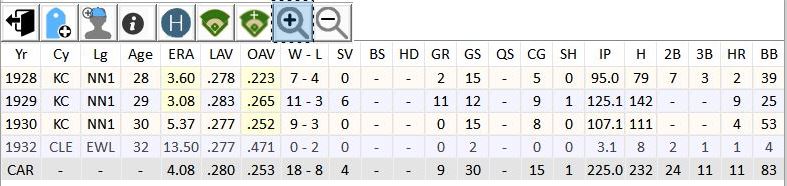
In this first example you see 3 stat lines for the pitcher: 1928, 1929, 1930. Below them, shaded in gray, is the Career (CAR) stat line. This line is a weighted representation of the pitcher’s career stats set to a standard, in this case 225 Innings Pitched. The 225 IP standard ensures that you can use this pitcher up to 225 IP (plus the usual 5% leeway) or so without incurring the RPL penalty for overuse.
Note: ‘’Pitchers used primarily in relief have their CAR lines set to a standard of 75 IP instead of 225 IP’’.
It’s important to know how this stat line is created, so observe now Example 2.
By expanding the selection to include ALL seasons (note the highlighted button) we can see that this pitcher also pitched a little in 1932. In regular mode, the 1932 stats are never drawn upon at game time. You would get either the 1928, 1929, or 1930 season when the pitcher was randomized. In CAR mode, however, all the historical stats matter, and they affect performance. So, it’s important to know what’s “under the hood” so to speak.
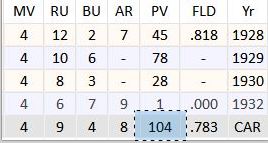
The salary of a player also changes in CAR mode. If we scroll over to the far right of the screen we see the career PV (total player value), the amount on which his contracted salary will be based. This figure is not a simple average of seasonal player values but rather an assessment of the player’s relative career worth set to 225 IP.
CAR mode adds a little more complexity to player research and drafting, but ultimately makes our sim more flexible.
What Should I Consider Before Using it?
CAR mode uses splits and situational stats only if about 50% of a player’s career has splits available.
CAR mode must be indicated on the draft card (see below). With the exception of Auxiliary Roster call-ups, the draft is the only opportunity to put a player in CAR mode.
Once drafted a player remains in CAR mode for the duration of his contract. Contract duration is unaffected by CAR mode. For example, a player can be signed for multiple seasons, released on waivers, have his contract renegotiated or bought out, just as in regular mode.
The CAR stat line itself does not adjust on screen when you click the adjustment buttons because, in effect, a CAR stat line removes a player from the park and seasonal norms and put him into an alternate adjustment “universe” determined at game time. While you can’t see adjustments for the CAR line you can see them for itemized seasons and this will give you a reasonably good idea how the adjustments are made.
CAR mode can make many expensive players more affordable.
CAR mode offers you the chance to use part-time (bench) players as starters.
CAR mode mitigates against seasonal gyrations in performance.
Since CAR mode uses career defensive stats, position players will typically be able to play at more positions, eliminating in many cases the need for “drag effects” when players are used out of position.
Most importantly, in line with our commitment to full integration, CAR mode allows us to use Negro League players as full-time players and not relegate them mostly to the so-called odds and ends pools (OEB,OEP)!
How do I Put a Player in Career Mode?
Via Draft
When filling out your draft card, note the column header CAR. It’s a “hot” or clickable column and you can toggle player into career mode once he’s on your card. When in CAR mode, the ‘TM’ symbol appends to the player’s name. In the following example, Dennis Leonard has been toggled into CAR mode. When drafted, the sim will access a separate career database to generate his probabilities.
Via Auxiliary Call-Ups
You can also elect to place a player in Career Mode when you call him up from the Auxiliary Roster. After you select and sign the player to a short or long term contract, the CAR button will activate, allowing you to select CAR mode.
Handling Negro League Players
Version 7.0 added every stat line for every player between 1920 - 1948 for the seven Negro Leagues recognized by MLB as major leagues. Adding adding every player’s stats (1) makes possible an era-true league normalization profile for accurate adjustments, and (2) offers the possibility of accurate career (CAR) stats for reliable simulations. The NSB Custom League Designer allows the use Negro League players in teams that you design. Simply search for them by the cities they played in.
Josh Gibson's Negro League Stat Lines
Modeling Missing Stats
Negro League stats have not been as thoroughly researched as conventional MLB stats. This work is ongoing, and painstakingly slow, built from game level up by the use of newspaper box scores. Batter’s strike outs, and often pitcher’s home runs allowed, are unavailable. And there are many seasons for which no defensive stats exist. So we created a modeling technique based on player tendencies and the stats we have. If we couldn’t model missing stats based on adjacent seasons, we used the AL/NL tendencies for that year to create a baseline true to the era.
Many photos are missing, too, although a surprising number are available, and we have included all we could find.
During the tenure of the Negro Leagues there were several teams comprised of predominantly Cuban players who did not have a home park. They were “barnstorming” teams, or traveling teams, and played only in their opponent’s parks. The Cuban Stars East (CSE) and Cuban Stars West (CSW) were the most notorious barnstormers.
Philosophy
Our guiding philosophy was “full integration” since this is precisely what was missing in segregated baseball. Full integration means that we are not offering a “special” way of including these players, like a supplemental draft or minor league system, for example. We wanted them to be treated like all other players as a matter of justice. Therefore they are part of any drafting pool spanning the years 1920 - 1948, priced the same as all other players. We do not treat them as AAA, or AA, that is, as if they were a level or two down from MLB class players with performance penalties. Please understand this as a philosophical decision. While it’s true that many of these players would not have been of sufficient quality to play in MLB at the time, we are choosing not to adjudicate this difference and simply let them play with the stats they accrued during their careers. After all, some of them would have outperformed many of their white counterparts, too. We have already crossed this bridge by including white players in the early decades of MLB, many of whom would be unable to play competitively in today’s game. We include them without question.
Now, the choice for “full integration” means that some of our leagues will have no access to them on account of the way they are designed–for example, our Dead Ball leagues or a league like Modern Times, which uses only players debuting from 1950 onwards.
How Can I Tell if Someone Played in the Negro Leagues?
You will see a superscript ‘1’ appended to the player’s name when researching draft pools, waiver wire, and the Auxiliary Roster. Once a player reaches your team, the ‘1’ no longer shows. We use it to make Negro League Players easily recognizable. The following example shows an Auxiliary Roster stocked with Negro Leaguers.
When researching in the database Negro League players are also detectable by their league (and sometimes city) abbreviations.
NN1 - Negro National League I (1920 - 1931)
NN2 - Negro National League II (1933 - 1948)
NAL - Negro American League (1937 - 1948)
ECL - Eastern Colored League (1923 - 1928)
NSL - Negro Southern League (1932)
EWL - East West League (1932)
ANL - American Negro League (1929)
Advice for Drafting Negro Leaguers
Because these players played far fewer official league games than their white counterparts, their seasonal stat totals are markedly lower. However, if you draft them in Career Mode you will have enough plate appearances to rely on them as position players. We recommend this! A good many of these players are prized draftees.
Recommended 4-man rotation for short tournaments.
Manage Pitching Rotation
Rotation changes can be made by clicking the ’‘’Manage Button’’’ on the main toolbar, then selecting the ’‘’Rotation Tab’’’ as shown below.
Managing Rotation Tab
In the window on the ’‘’Rotation Tab’’’ are three lists: [1] ’‘’Current Rotation Applied to Upcoming Games’’‘, [2]’‘’Starting Rotation’’‘, and [3]’‘’Eligible Starters’’’. Successfully managing your rotation requires understanding how these lists are related.
Adding and Moving Pitchers
To add a pitcher to the rotation, find him in the list of ’‘’Eligible Starters’’‘, click on his line, and drag him leftward dropping him into the slot of your choice. A pitcher is eligible to start if he is currently designated as ’Active’ and had at least 1 actual start during the historical season represented.
To move a pitcher within the rotation, drag him up/down in ’‘’Starting Rotation’’’.
Removing a Pitcher
Setting and Resetting the Rotation
As you watch the video, note the following:
Resetting the rotation moves the checkmark (indicating the next man up) to the top line. This makes for a cleaner look and offers some conceptual clarity as you prepare for your upcoming games.
Rotation Depth can be set either as ‘Standard’ (5 pitchers or fewer) or ‘Extended’.If you don’t want to finagle your rotation on a regular basis, set up a 4 - 5 man rotation and simply let it continue cycling.
An ‘Extended’ rotation (6 pitchers or more) offers more flexibility in your rotation plan. This is often needed in order to optimize matchups because some leagues may require you to plan for up to 11 games for the next season event! ‘Extended’ rotations permit multiple iterations of the same pitcher. Be cautious, however. If you forget to change your rotation and the sim determines that a pitcher is injured or too tired, it will automatically and without warning remake your rotation. So while ’Extended” rotations offer greater managerial control they also require you to be more active.
Rotation Applied To Upcoming Games
With each change made to the rotation, the ’‘’Current Rotation Applied to Upcoming Games’’’ list is updated so that you can see pitching matchups, opponents, venues, and relevant park factors. A green flag appearing to the left of the pitcher indicates that his start date will fall within the date range of the next sim event. A red flag indicates that his start date lies beyond the range of the next sim event.
Important Note: Opposing pitchers shown may or may not be correct. It depends, obviously, on whether other owners make changes to their rotations. If you are playing against a league-owned team, the matchups are guaranteed unless except in the case of injury.
Pitcher FAT
FAT refers to the current fatigue state. 10.0 is considered full strength. If the diagnostic checker flags your rotation, it’s likely because a fatigued pitcher is too near the top of the rotation.
Pitcher RPL (Real Play)
The second column of the ’‘’Eligible Pitchers’’’ list displays a green, yellow, or red light indicating whether a pitcher’s current pace of play puts him under or over his historical pace of play. Pitchers “in the red” are either on a pace to exceed or have already exceeded their historical play. As such, they are more likely to suffer injuries, so manage accordingly.