• nostalgiasimbaseball@gmail.com
Nostalgia Sim Baseball Logo Nostalgia Sim Baseball Logo
  • Play NSB
  • Hosted Leagues
  • Features
  • Products
  • Download
  • Guide
  • Blog
  • Contact

Handling Negro League Players

Version 7.0 added every stat line for every player between 1920 - 1948 for the seven Negro Leagues recognized by MLB as major leagues. Adding adding every player’s stats (1) makes possible an era-true league normalization profile for accurate adjustments, and (2) offers the possibility of accurate career (CAR) stats for reliable simulations. The NSB Custom League Designer allows the use Negro League players in teams that you design. Simply search for them by the cities they played in.
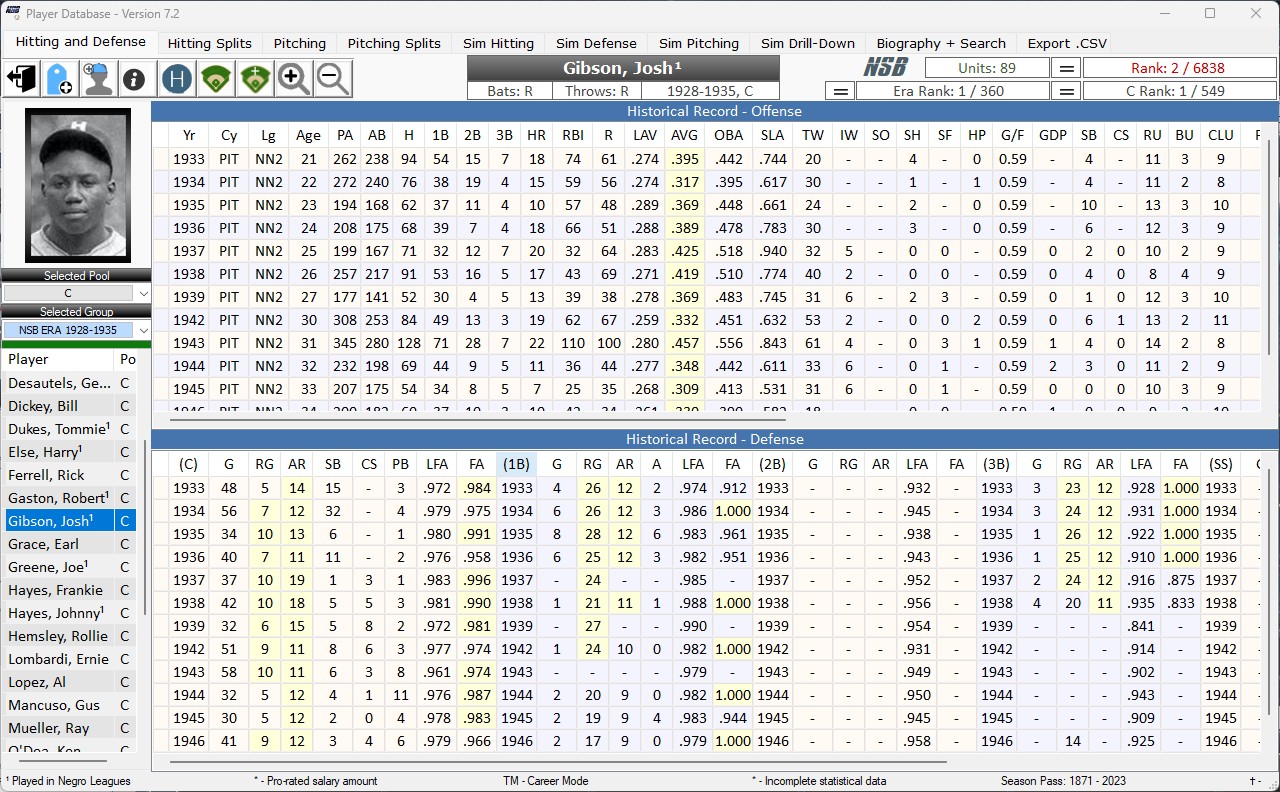
Josh Gibson's Negro League Stat Lines

Modeling Missing Stats

Negro League stats have not been as thoroughly researched as conventional MLB stats. This work is ongoing, and painstakingly slow, built from game level up by the use of newspaper box scores. Batter’s strike outs, and often pitcher’s home runs allowed, are unavailable. And there are many seasons for which no defensive stats exist. So we created a modeling technique based on player tendencies and the stats we have. If we couldn’t model missing stats based on adjacent seasons, we used the AL/NL tendencies for that year to create a baseline true to the era.

Many photos are missing, too, although a surprising number are available, and we have included all we could find.

During the tenure of the Negro Leagues there were several teams comprised of predominantly Cuban players who did not have a home park. They were “barnstorming” teams, or traveling teams, and played only in their opponent’s parks. The Cuban Stars East (CSE) and Cuban Stars West (CSW) were the most notorious barnstormers.

Philosophy

Our guiding philosophy was “full integration” since this is precisely what was missing in segregated baseball. Full integration means that we are not offering a “special” way of including these players, like a supplemental draft or minor league system, for example. We wanted them to be treated like all other players as a matter of justice. Therefore they are part of any drafting pool spanning the years 1920 - 1948, priced the same as all other players. We do not treat them as AAA, or AA, that is, as if they were a level or two down from MLB class players with performance penalties. Please understand this as a philosophical decision. While it’s true that many of these players would not have been of sufficient quality to play in MLB at the time, we are choosing not to adjudicate this difference and simply let them play with the stats they accrued during their careers. After all, some of them would have outperformed many of their white counterparts, too. We have already crossed this bridge by including white players in the early decades of MLB, many of whom would be unable to play competitively in today’s game. We include them without question.

Now, the choice for “full integration” means that some of our leagues will have no access to them on account of the way they are designed–for example, our Dead Ball leagues or a league like Modern Times, which uses only players debuting from 1950 onwards.

How Can I Tell if Someone Played in the Negro Leagues?

You will see a superscript ‘1’ appended to the player’s name when researching draft pools, waiver wire, and the Auxiliary Roster. Once a player reaches your team, the ‘1’ no longer shows. We use it to make Negro League Players easily recognizable. The following example shows an Auxiliary Roster stocked with Negro Leaguers.
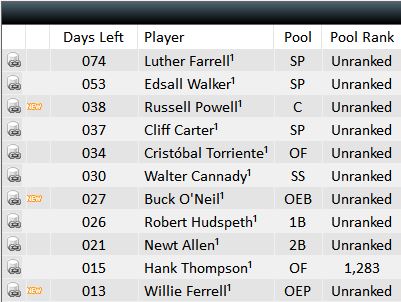
When researching in the database Negro League players are also detectable by their league (and sometimes city) abbreviations.

  • NN1 - Negro National League I (1920 - 1931)
  • NN2 - Negro National League II (1933 - 1948)
  • NAL - Negro American League (1937 - 1948)
  • ECL - Eastern Colored League (1923 - 1928)
  • NSL - Negro Southern League (1932)
  • EWL - East West League (1932)
  • ANL - American Negro League (1929)

Advice for Drafting Negro Leaguers

Because these players played far fewer official league games than their white counterparts, their seasonal stat totals are markedly lower. However, if you draft them in Career Mode you will have enough plate appearances to rely on them as position players. We recommend this! A good many of these players are prized draftees.

How to plan and manage your pitching rotation, with clear steps and how-to videos
Recommended 4-man rotation for short tournaments.

Manage Pitching Rotation

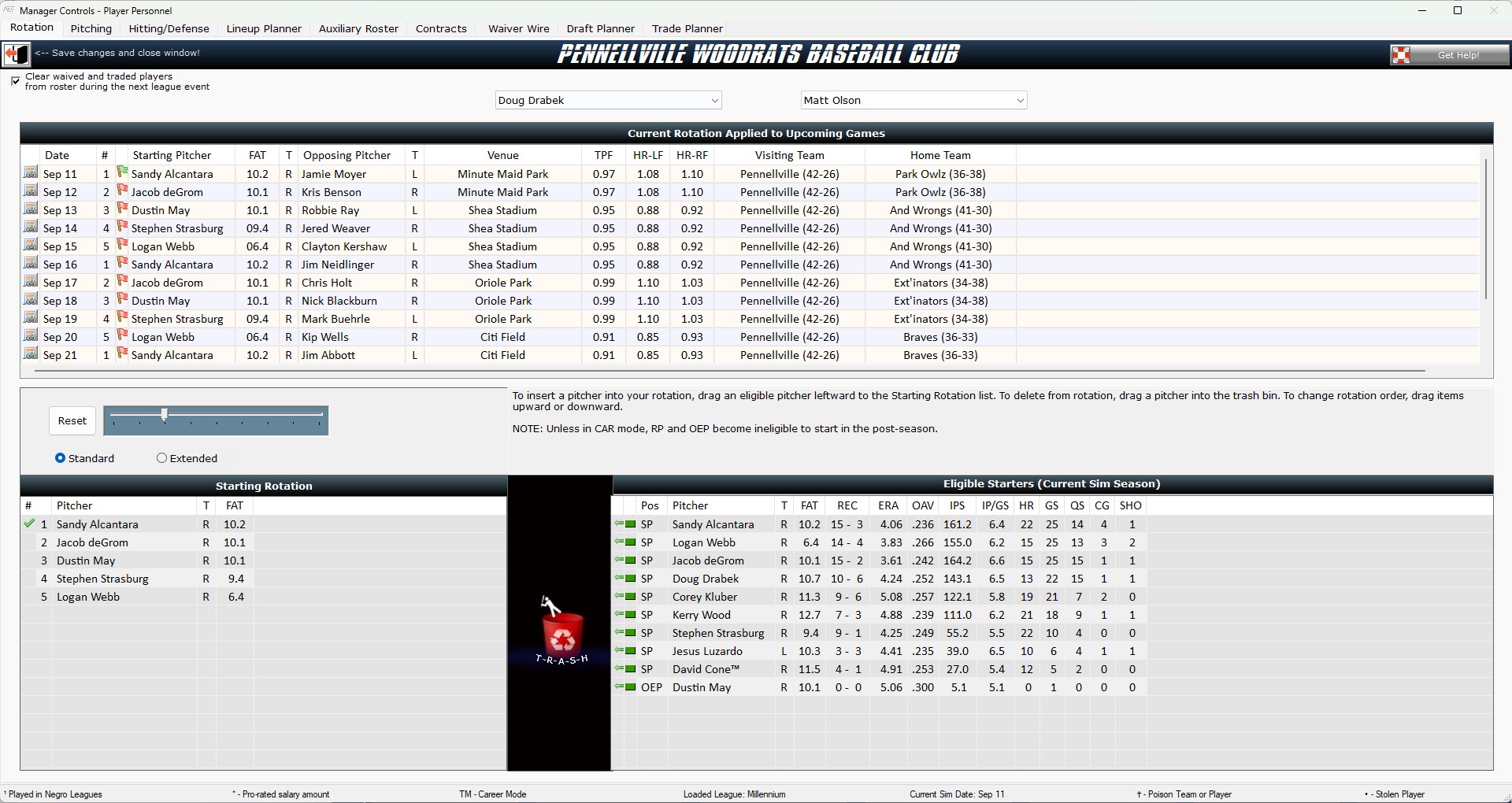
Rotation changes can be made by clicking the ’‘’Manage Button’’’ on the main toolbar, then selecting the ’‘’Rotation Tab’’’ as shown below.

Managing Rotation
Managing Rotation Tab

In the window on the ’‘’Rotation Tab’’’ are three lists: [1] ’‘’Current Rotation Applied to Upcoming Games’’‘, [2]’‘’Starting Rotation’’‘, and [3]’‘’Eligible Starters’’’. Successfully managing your rotation requires understanding how these lists are related.

Adding and Moving Pitchers

To add a pitcher to the rotation, find him in the list of ’‘’Eligible Starters’’‘, click on his line, and drag him leftward dropping him into the slot of your choice. A pitcher is eligible to start if he is currently designated as ’Active’ and had at least 1 actual start during the historical season represented.

To move a pitcher within the rotation, drag him up/down in ’‘’Starting Rotation’’’.

Removing a Pitcher

Setting and Resetting the Rotation

As you watch the video, note the following:

  • Resetting the rotation moves the checkmark (indicating the next man up) to the top line. This makes for a cleaner look and offers some conceptual clarity as you prepare for your upcoming games.
  • Rotation Depth can be set either as ‘Standard’ (5 pitchers or fewer) or ‘Extended’.If you don’t want to finagle your rotation on a regular basis, set up a 4 - 5 man rotation and simply let it continue cycling.
  • An ‘Extended’ rotation (6 pitchers or more) offers more flexibility in your rotation plan. This is often needed in order to optimize matchups because some leagues may require you to plan for up to 11 games for the next season event! ‘Extended’ rotations permit multiple iterations of the same pitcher. Be cautious, however. If you forget to change your rotation and the sim determines that a pitcher is injured or too tired, it will automatically and without warning remake your rotation. So while ’Extended” rotations offer greater managerial control they also require you to be more active.

Rotation Applied To Upcoming Games

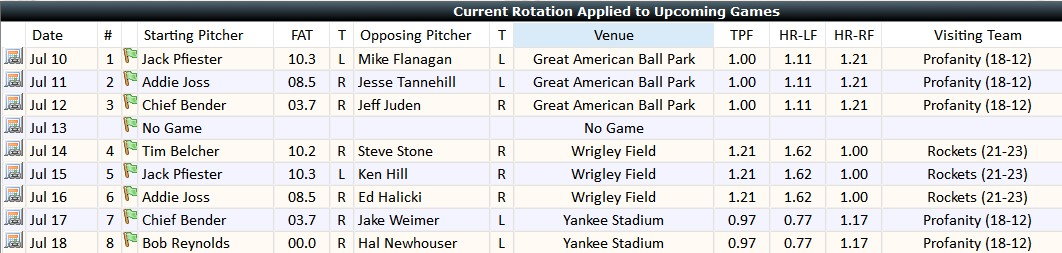
With each change made to the rotation, the ’‘’Current Rotation Applied to Upcoming Games’’’ list is updated so that you can see pitching matchups, opponents, venues, and relevant park factors. A green flag appearing to the left of the pitcher indicates that his start date will fall within the date range of the next sim event. A red flag indicates that his start date lies beyond the range of the next sim event.

Important Note: Opposing pitchers shown may or may not be correct. It depends, obviously, on whether other owners make changes to their rotations. If you are playing against a league-owned team, the matchups are guaranteed unless except in the case of injury.

Applied Rotation

Pitcher FAT

FAT refers to the current fatigue state. 10.0 is considered full strength. If the diagnostic checker flags your rotation, it’s likely because a fatigued pitcher is too near the top of the rotation.

Pitcher RPL (Real Play)

The second column of the ’‘’Eligible Pitchers’’’ list displays a green, yellow, or red light indicating whether a pitcher’s current pace of play puts him under or over his historical pace of play. Pitchers “in the red” are either on a pace to exceed or have already exceeded their historical play. As such, they are more likely to suffer injuries, so manage accordingly.

Park Assignments and Park Effects

How Parks are Assigned

Where your team plays depends upon how you first enter the Nostalgia Baseball system.

If you enter as part of a newly-forming league, then all parks (and the specific year) are randomly assigned. Ballpark editions before 1893 are currently unavailable. Each new league is comprised of 16 - 24 teams, 8 - 12 of which play in American Conference parks and 8- 12 of which play in National Conference Parks. Each team will have a unique city - league combination so as not to duplicate parks. Among the league’s teams, it is possible for a park to be used more than once, because some parks saw both American and National League action (Sportsman's Park or County Stadium in Milwaukee to name a couple).

If you take over a franchise in an existing league, you must also take over the park. Taking over a franchise obligates you to take all personnel under contract and the park, though your financial situation may be changed by the commissioner, especially if the previous owner went bankrupt. 

Park Effects

All ballparks have certain influential tendencies that vary from year to year. Your park will reflect these characteristics continually, so it’s wise to draft personnel with the park in mind.

To see your complete park effects, click the Parks button on the Main Toolbar, like this:

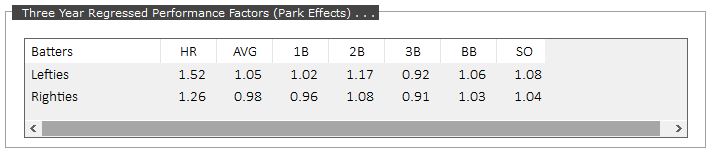
Once the window opens you’ll see several tabs. Click the tab on the right to pull up detailed information on your park. Beginning with Version 7, park factors are now “regressed” so that each season picks up the tendency of the season before and after whenever possible. This adds accuracy, yielding a truer park effect than single season tendencies alone.

Factors are represented as decimals, and broken down by their effects on both righties and lefties. 1.00 is neutral representation. In the following example, lefties can be expected to hit 1.52 as many homers as they might hit in a neutral park. Bear in mind that for every batter-pitcher matchup, players are adjusted BOTH for the original park in which they actually played AND the park in which they are playing during simulation. This double adjustment can sometimes produce striking differences in sim performance.

Note that wherever data is available we are adjusting for the park’s effect on batting averages, home runs, singles, doubles, triples, walks, and strike outs.

Getting Rights to a New Park

  • There are only two ways to get a new park in Nostalgia Baseball: either get a park chip by winning the park lottery or get a park chip by advancing high enough in owner class. Lottery tickets can be purchased up until the season date of August 31st. During the game event that nudges past August 31st, the lottery will run. You can see the results in the League News report. If you win the lottery, you will need to make a decision on a new park sometime before the next draft commences.

  • Having a park chip does not obligate you to move to a new park. However, ball park chips cannot be bought and sold.

  • If you decide on a new park, you’ll be assessed a one-time fee. The cost is substantial, but is more than offset by enhanced revenues.

  • To encourage owners to try new parks, owners in transit are permitted to carry negative account balances without penalty for their first year in the new park.

  • Your first four seasons in a new park come with guaranteed “Park Revenue” on a descending curve (25%, 17%, 12% and 5% percent of the seasonal owner’s salary).

  • At the end of the fourth season “Park Revenues” disappear.

  • A simple cost-benefit analysis shows that new stadiums are a financial perk. Assuming a stable BSU of 1500, the cost of the new stadium would be 600 units. But that investment would generate excess revenues of 375, 255, 180 and 75 units over the next four seasons, paying for itself in just two seasons, and gradually placing the owner in an improved financial condition. Note: actual profits will vary depending upon the BSU value; only the percentages are guaranteed.

  • You cannot submit a new park request until a previous new park cycle is completed. When the park credit line in your ledger goes to zero you will be eligible, provided you possess rights to a new park.

Subcategories

Page 2 of 2

  • 1
  • 2

This section of the website is under development. A new set of how-to videos are being prepared on our YouTube Channel.

User Guide Topics

League Types

  • Poison Tournaments

Reference

  • Create and Run a Custom League
  • AI Engine Design for League-Supported Teams
  • Career Mode
  • Philosophy of Negro Leagues Simulation
  • Why Splits Matter in the Sim

Strategy

  • Managing – Pitching Rotation
  • Park Assignments and Effects
  • Play NSB
  • Hosted Leagues
  • Features
  • Products
  • Download
  • Guide
  • Blog
  • Contact